

20 Best MiniMax H3 Image Prompts (With Examples)
Copy 20 MiniMax H3 Image prompts for product photos, posters, menus, and photo edits. See example outputs, settings, and what each prompt controls.
A café menu asks an image model to keep prices beside the right dishes. A product tile asks it to line up three shoes in the right colors. An edit asks it to move two people’s hands while keeping the rest of the photo steady. MiniMax H3 Image can tackle all three with a prompt that spells out the layout, wording, or changes.
Pick an example close to your brief, copy the full prompt, or open it in Studio with Try. The settings under each example describe the source or give you a starting point. Studio fills in an available aspect ratio and resolution preset. Sample images are credited to MiniMax, Runware, Pixel Dojo, and fal.
1. Farm-to-Table Feast with a Short Prompt
Start with the camera angle and the ingredients. The prompt enhancer can work out the placement, props, and lighting. The two outputs below come from the expanded prompt in example 2.
Parameters · Published workflow · 4:3 · 4736 × 3552 per output · prompt enhancement

MiniMax comparison. Local inference on the left and API inference on the right.
A rustic, overhead shot of a farm-to-table feast, showcasing a variety of colorful, seasonal vegetables, artisanal cheeses, and freshly baked bread on a weathered wooden table.
2. Farm-to-Table Feast with a Full Composition
Place the bread in the center, then use the edges and corners to organize the rest of the table. The position of the light gives all those separate objects the same direction of shadow.
Parameters · Published workflow · 4:3 · 4736 × 3552 per output · expanded prompt
The local and API outputs are the same comparison shown in example 1.
The image is an overhead, top-down photograph of a rustic farm-to-table feast spread across a weathered, dark brown wooden table with visible grain, knots, and a worn finish. In the center, a large woven basket holds a freshly baked rustic loaf of bread with a cracked golden-brown crust and scattered flour, alongside a halved loaf. To the left, a large dark ceramic plate presents an assortment of colorful seasonal vegetables, including bright orange carrots, deep red heirloom tomatoes, purple cabbage, and a mound of vibrant green leafy kale and arugula. On the right side, a wooden board displays artisanal cheeses: a wedge of sharp aged cheddar, a round of creamy brie with a rind, a soft blue cheese, and a few scattered almonds and walnuts. Below the bread in the lower center, a shallow bowl contains roasted root vegetables, including golden potatoes and beets, sprinkled with fresh rosemary sprigs. At the upper right, a glass jar of golden olive oil stands beside a smaller jar of honey with a wooden dipper. In the lower left, a rustic cloth napkin holds a silver knife and fork. At the upper left, a bunch of purple and red grapes rests near a small bowl of black olives. Scattered herbs, including fresh thyme and sprigs of oregano, decorate the table. The lighting is natural and warm, coming from the upper left and casting soft, long shadows to the lower right.
3. Podcast Fist Bump with a Short Edit
Use a landmark already in the photo to place the new gesture. Here the desk sign and the gap between the microphones tell the model where the fists should meet.
Parameters · Published workflow · 1:1 · 4096 × 4096 per output · 1 reference image


In the comparison, the original is on the left, the local edit is in the center, and the API edit is on the right.
Take the over-ear headphones off the man on the left and fill in his hair where the band flattened it. Have both hosts lean toward each other and fist-bump directly above the "MONEY TALKS" desk sign, knuckles touching, elbows lifted off the desk, so the bump sits dead centre between the two microphones.
4. Podcast Fist Bump with Preservation Rules
The expanded edit calls out the parts worth protecting, including the mugs, signs, lighting, and faces. It then describes the new pose and how to fill in the hair where the headphones sat.
Parameters · Published workflow · 1:1 · 4096 × 4096 per output · 1 reference image · expanded edit
This is the same comparison as example 3.
The dark, warmly lit podcast studio photograph of two hosts behind a wooden desk in <Picture 1> is mostly preserved: the large "EP. 47" title in the top right corner, the dark textured wall, the wooden shelves with plants, a brass globe, a lit candle, books and the "DISCIPLINE > MOTIVATION" chalkboard, the framed "COMPOUND CONSISTENCY CONFIDENCE" poster, the glowing floor lamp on the left and the table lamp on the right, the two black microphones on their stands, the black "INVEST IN YOURSELF" and "PLAN BUILD WEALTH" mugs, the carved wooden "MONEY TALKS" desk sign, the dark wooden desk, both hosts' faces, smiles and clothing, the man's wristwatch and the woman's hoop earrings all stay exactly the same. Only the headphones and the hosts' poses change. The over-ear headphones and their cable are removed from the man on the left, and his short, tousled dark brown curly hair is filled in naturally over the top and sides of his head where the headband had flattened it, leaving no dent or mark. The two hosts lean toward each other and bump fists directly above the "MONEY TALKS" sign: one fist from each host meets with the knuckles touching, both elbows lifted off the desk, so the fist bump sits exactly at the horizontal centre of the frame, midway between the two microphones.
5. Potter Shaping a Clay Bowl
Describe which hand supports the bowl and which hand shapes it. A camera at hand level makes the contact between skin and clay the focus.
Parameters · Suggested setup · 4:3 · 2K · 1 image
A naturalistic photograph of a woman potter seated at a pottery wheel in a sunlit workshop, viewed from her left side at approximately hand level. A medium composition includes her profile, shoulders, forearms, hands, and the complete bowl on the wheel, with enough of the wheel and stool visible to make her working posture clear. She leans slightly forward with relaxed shoulders and looks down at the clay. Capture one precise moment as her left hand supports the bowl's outer wall while the fingertips of her right hand shape the inner surface near the rim. Her hands oppose each other gently across the same section of clay; the bowl stays centered on the wheel head. Wet slip coats her fingertips and gathers in fine concentric ridges on the rounded bowl. The rim is smooth, open, and clearly separated from her fingers. Soft sunlight enters from a side window, catching the moisture on the clay and casting gentle shadows beneath her wrists. A worn wooden workbench and quiet shelves recede out of focus, keeping attention on the hands and their contact with the bowl. Warm earth tones, believable skin texture, and subtle workshop wear give the scene a tactile, unposed quality. No lettering or additional people appear.
MiniMax text-to-image writing guide
6. Sales Dashboard with Exact Values
Give the model the total, the three row values, the chart scale, and the position of each panel. When reviewing the image, check that the chart, table, and summary cards agree.
Parameters · Suggested setup · 16:9 · 2K · 1 image
A clean 16:9 sales dashboard on a warm white background uses a restrained charcoal-and-teal palette, crisp sans-serif typography, and a consistent alignment grid. The title "Quarterly sales" sits at the upper left. Two compact summary cards occupy the top row beneath it: "Total units" with the value "39", and "Best-performing product" with "B — 18 units". These values summarize the supplied three-product dataset. The lower left contains a large vertical bar chart. Its horizontal axis is labeled "Product", with categories "A", "B", and "C" in that order; its vertical axis is labeled "Units" and has evenly spaced ticks at 0, 5, 10, 15, and 20. All bars share the same zero baseline and equal widths. Their heights correspond exactly to 12, 18, and 9, and each value is printed clearly above its bar. Product B is teal; A and C use the same muted gray. At the lower right, a compact table has the column headings "Product" and "Units", followed by the rows "A | 12", "B | 18", and "C | 9". There are no invented dates, forecasts, percentage changes, or additional data series.
MiniMax text-to-image writing guide
7. Recolor a Red Cup to Blue
Upload a photo with a red cup on the left and a lemon on the right. The prompt anchors the cup and lemon separately so the new color can follow the cup’s existing highlights and shadows.
Parameters · Suggested setup · 4:3 · 2K · 1 reference image
The red cup on the left in <Picture 1> is <Subject 1>. The lemon on the right in <Picture 1> is <Subject 2>. The target image shows <Subject 1> with a blue finish. <Subject 1> is partially preserved; its shape, material, position, and scale remain while its surface color changes. <Subject 2> is fully preserved. The blue finish follows the existing surface shading and highlights of <Subject 1>, with the rest of the source image unchanged.
MiniMax image editing writing guide
8. Fashion Poster from Two References
Upload the coat first and the vase second. The coat provides the garment and folds, while the vase provides the color. The prompt also reserves room for an exact two-line headline.
Parameters · Suggested setup · 3:4 · 2K · 2 reference images in order, coat then vase
The front-facing beige coat in <Picture 1> is <Subject 1>. The body color of the vase in <Picture 2> is <Subject 2>. The target image is a portrait fashion poster featuring <Subject 1> beneath a short headline. <Subject 1> is partially preserved; its cut, fabric texture, folds, and front-facing presentation remain while its color, scale, and placement change. <Subject 2> supplies the exact body color transferred to <Subject 1>. The transferred color follows the existing garment shading without importing the vase's glaze or shape. <Subject 1> is centered in the lower two-thirds of the poster, with its full hem and sleeves visible. A new warm off-white background extends evenly to the edges, leaving generous space around the garment. The headline 'A quieter kind of bold.' appears above it in large charcoal serif lettering, arranged on two centered lines: 'A quieter kind' followed by 'of bold.' The composition contains no other lettering, brand names, or decorative props.
MiniMax image editing writing guide
9. Sleeping Tabby with Prompt Expansion
Try this as a short brief. MiniMax’s prompt expansion example turns it into a warm photograph with late-afternoon light and recommends a landscape frame.
Parameters · Published expansion · suggested ratio 3:2 · Studio starting point 4:3 at 2K
An orange tabby cat sleeping on a sunlit windowsill.
MiniMax prompt expansion model card
10. Sunlit Cat with Film Texture
Add a time of day and a texture cue to the same windowsill setup. This version gives the lighting and finish direction in a single line.
Parameters · API example request · exact size 2720 × 1536 · 1 image · URL response
An orange cat lying on a windowsill basking in the sun, warm afternoon light, film texture
MiniMax image generation API guide
11. Isometric Office Hero Illustration
Keep the office on the right and reserve the left half for a headline. Counting desks, people, and empty chairs gives the small scene a clear layout.
Parameters · Published settings · exact size 2560 × 1440 · 16:9
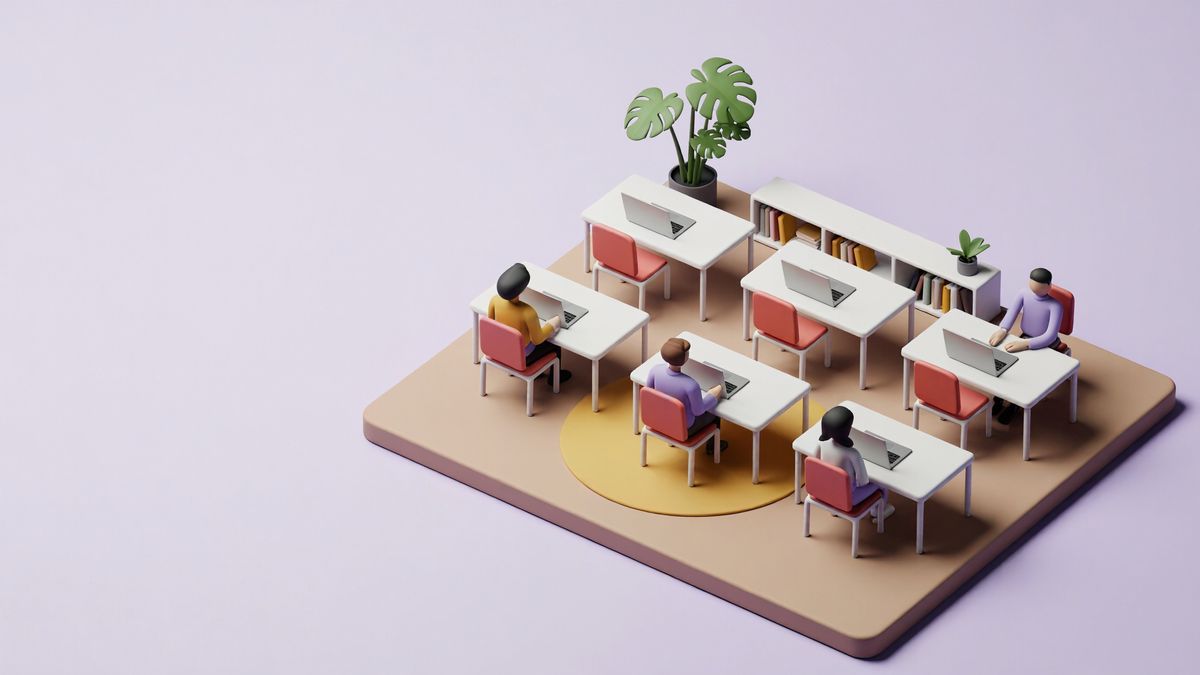
A wide hero illustration for a project management app's landing page. An isometric 3D diorama of a small open-plan office built on a single square floor slab, floating on a plain pale lavender background and seen from the front-right corner. The slab sits in the right half of the frame, and the left half is empty pale lavender with nothing in it, kept clear for a headline. On the slab, six white desks stand in two rows of three, each with one open laptop and one coral desk chair. Four people work at the desks, and the two desks on the left of the back row are empty, their chairs pushed in. A tall potted monstera stands in the back-left corner of the slab, a low white bookshelf runs along the back-right edge, and a round mustard rug lies under the front row. Smooth matte clay materials in white, lavender, coral and mustard, soft light from the upper left, gentle ambient occlusion where the desks meet the floor. Clean 3D product illustration, no text, no logos.
12. Vertical Yoga Story
Place the full pose and mat in the lower two-thirds of the image. The blank wall above leaves room for a title card.
Parameters · Published settings · 2K preset · 9:16 requested in the prompt · 1536 × 2720 result
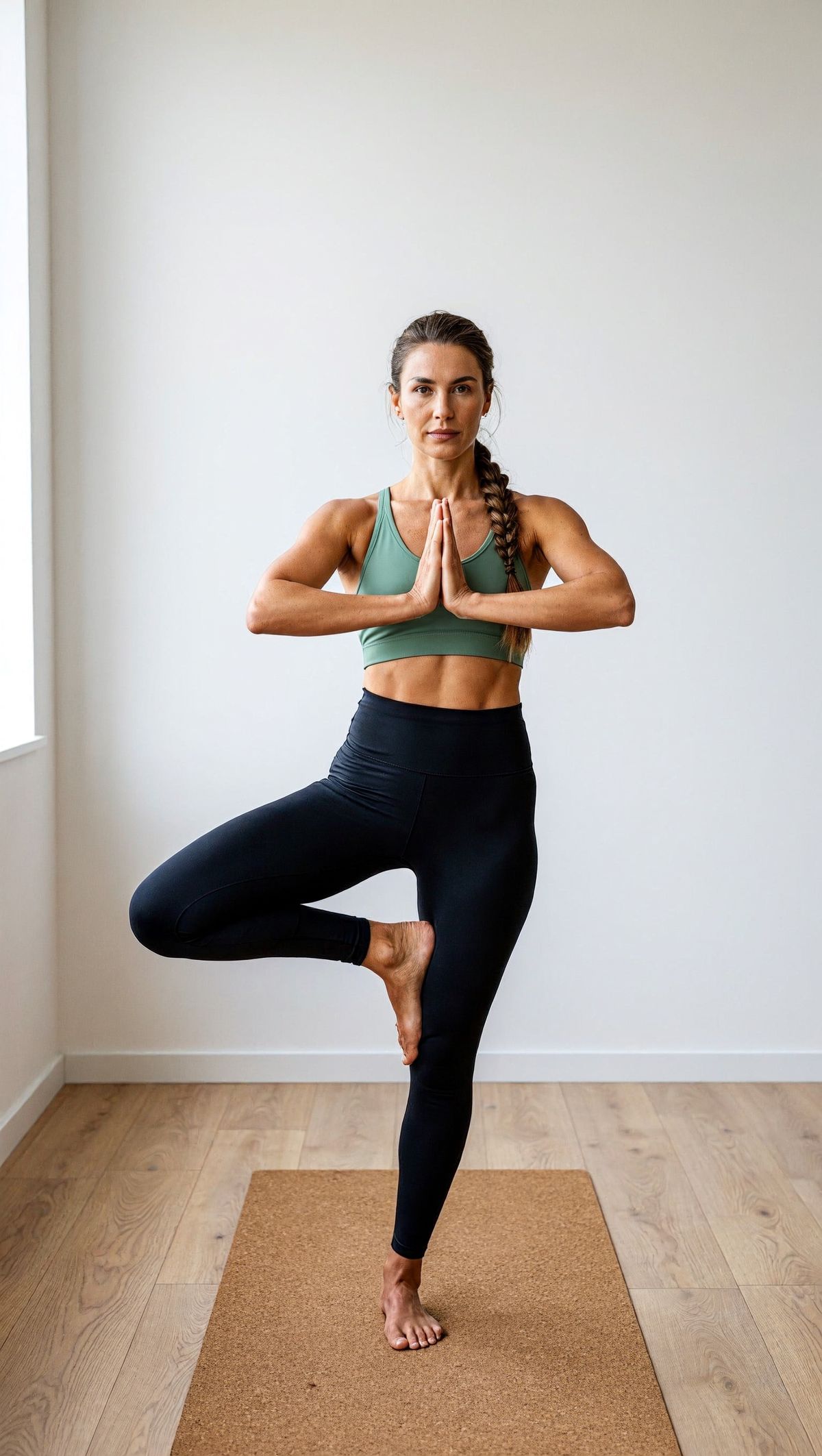
A vertical 9:16 story image for a fitness app's morning mobility series. A woman in her thirties with long braided hair, wearing a sage green sports top and black leggings, stands in tree pose on a cork yoga mat, facing the camera, her palms pressed together at her chest and her right foot resting against her left inner thigh. Her whole figure, from her head to her feet, fits in the lower two thirds of the frame, with the mat under her feet. The same plain white studio wall continues up through the upper third of the frame, with nothing on it, kept clear for a title card. Pale oak floor, soft morning light from a tall window out of frame on the left, a soft shadow falling to the right. Natural skin texture, true-to-life color, clean fitness editorial photography, no text, no logos.
13. Lakeside Cabin Link Preview
Give the image a specific slot and place the cabin away from the headline area. The quiet water on the left provides a background for the listing title.
Parameters · Published settings · exact size 1200 × 630
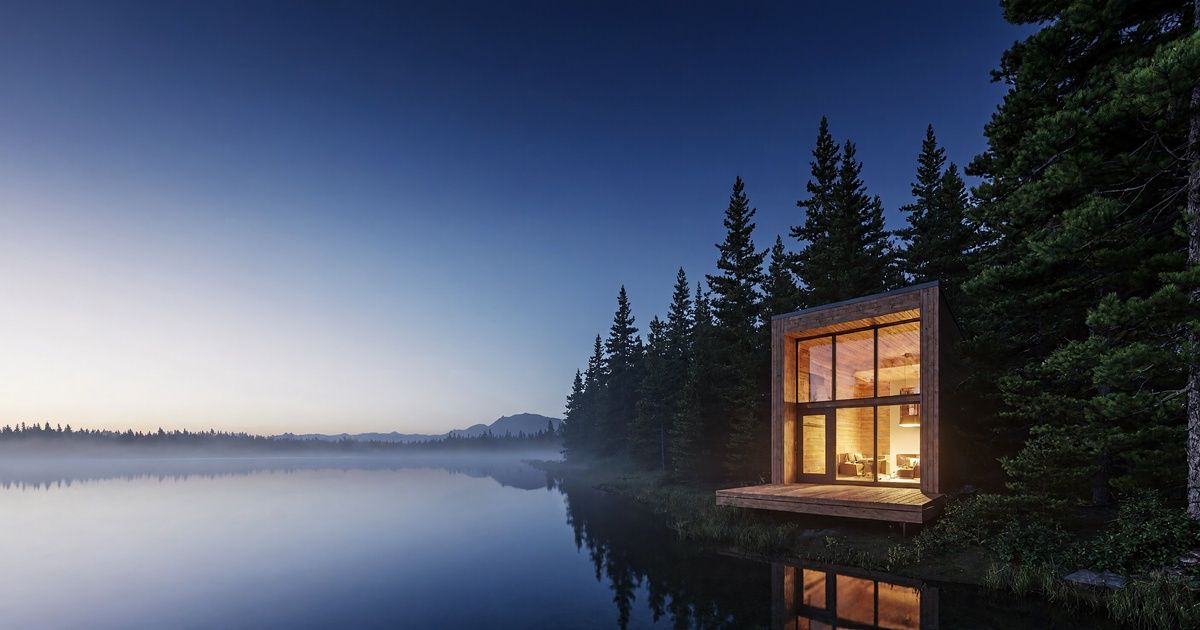
A wide link preview image for a vacation rental listing, the card shown when the listing is shared. A modern timber cabin with a full-height glass front and a cedar deck stands at the edge of a pine forest on the right third of the frame, seen at eye level from across a calm lake. Warm interior light glows through the glass. The left half of the frame is still water and pale evening sky with nothing in it, kept clear for the listing title. Blue-hour light, a faint reflection of the cabin on the water, soft mist over the far shore. Photoreal architectural photography, no text, no people.
14. Cliffside Fishing Village Concept Art
Describe the layout like a map. Put the boats and pier in the left foreground, the watchtower on the right, and the village between them.
Parameters · Published settings · size omitted · 4K default · 5472 × 3072 result
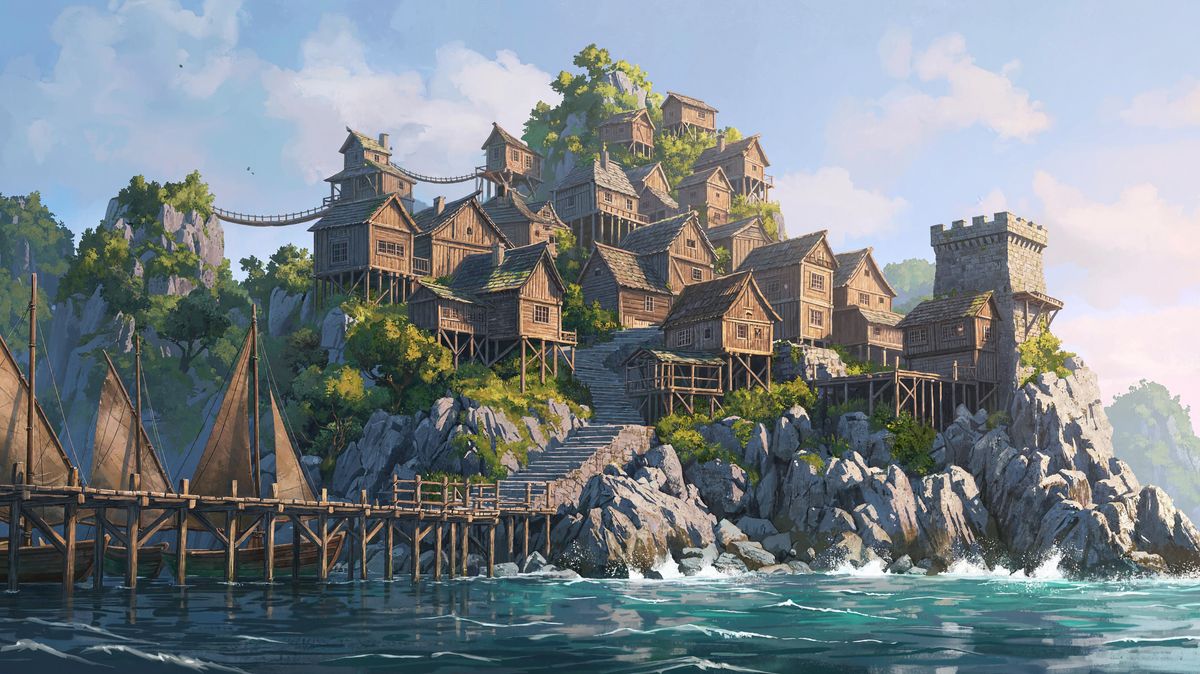
Wide landscape-format environment concept art for an open-world adventure game. A fishing village of stilted wooden houses climbs a steep green cliff above a turquoise bay, linked by rope bridges and narrow stairways. Three small sailboats are moored at a long wooden pier in the foreground on the left, and a stone watchtower stands on the headland on the right. Seen from the water at a low angle, with the village filling the center of the frame. Late afternoon sun from the right, warm light on the house walls, cool blue shadows in the cliff crevices, sea spray around the rocks below. Painterly game concept art with crisp detail in the foreground and soft atmospheric haze in the distance, no text, no characters.
15. Running Shoe Product Tile
Set the number, color order, and toe direction before describing fabric or light. Compare the structured result with the short-prompt result to see how much of the product arrangement the detailed brief controls.
Parameters · Published comparison · 1:1 for both images · prompt optimizer enabled · Studio starting point 2K
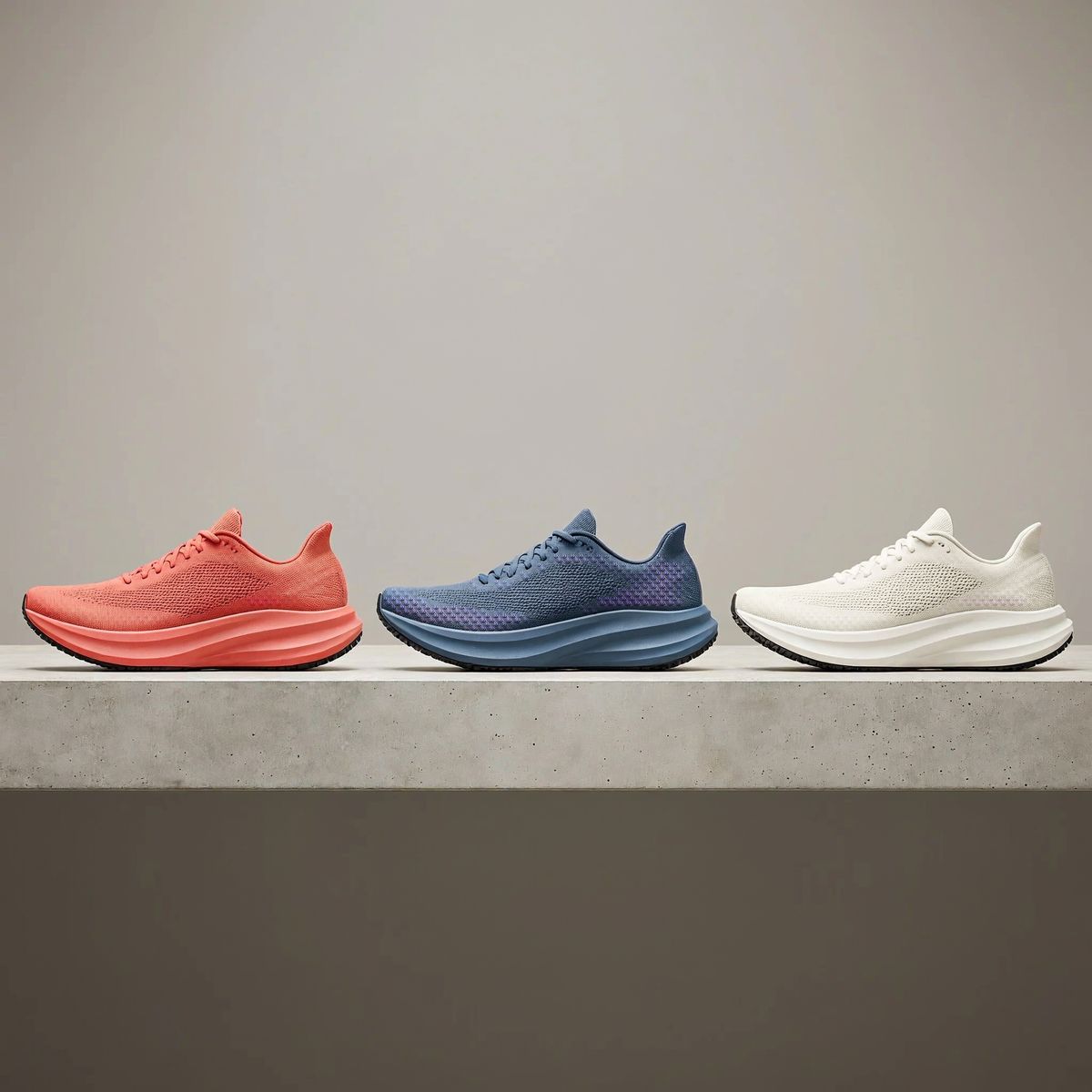
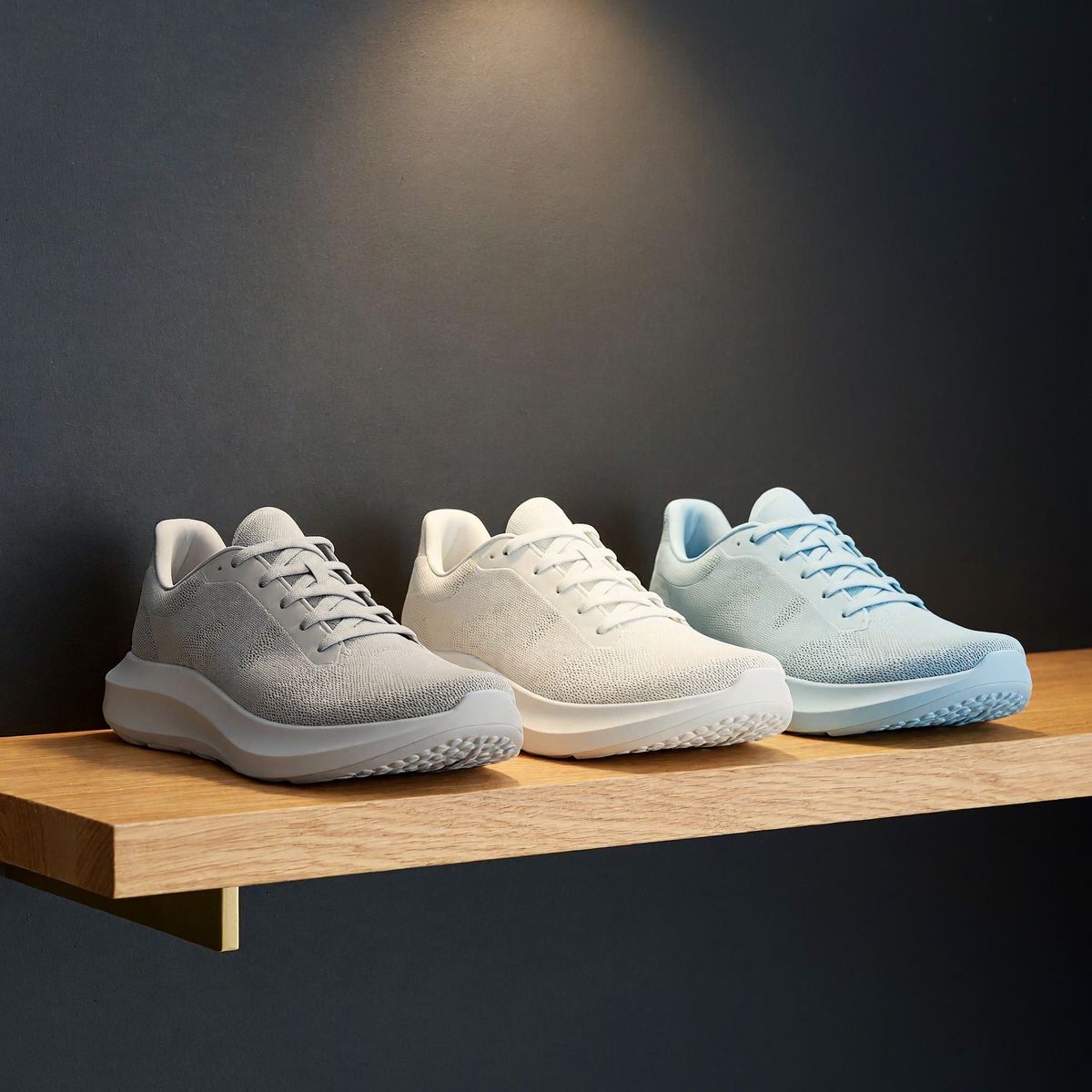
The first image uses the full prompt below. The second uses a short prompt asking for three plain running shoes on a shelf.
A square product tile for an online running store's new arrivals page. Three running shoes stand in a single row on a floating pale concrete shelf, evenly spaced, shown in side profile with every toe pointing left, from left to right in coral, slate blue and off-white. The camera is at shelf height, looking straight on. The row sits in the lower half of the frame, and the upper half is a plain warm gray wall with nothing on it. Each shoe has an engineered knit upper with a visible weave, a thick foam midsole with a matte finish and a rubber outsole with a fine tread. Soft diffused light from above and slightly left, a narrow highlight along each midsole, short soft contact shadows on the shelf. Photoreal e-commerce product photography, no text, no logos.
16. Five-Person Design Studio Team Photo
Assign each person a place in the row before describing their clothes and props. The central person also gives the hand-on-shoulder gesture a clear target.
Parameters · Published brief · 5 people, full length · 35 mm lens · Studio starting point 16:9 at 2K

A team photo for a design studio's About page. Five colleagues stand in a single row in front of a white-painted brick wall, evenly spaced, full length, all facing the camera. From left to right: a tall man in his fifties with a short gray beard, in a navy blazer over a white shirt; a woman in her twenties with a curly red bob, in a mustard sweater, holding a closed laptop against her chest; a man in his thirties in a denim jacket over a white T-shirt, standing in the middle with his arms crossed; a woman in her forties with straight black hair, in a green linen shirt dress, resting one hand on the shoulder of the man in the middle; a young man in a gray hoodie and round glasses, holding a tablet at his side. Shot at eye level with a 35mm lens, the row centered, with an even strip of wall above their heads and pale wooden floor below their feet. Soft even light from a large window on the left, natural skin texture, true-to-life color, editorial team portrait photography, no text, no logos.
17. Candid Fishmonger Portrait
Ask for an action in progress. The act of weighing the fish gives the hands something specific to do while the skylight defines the mood.
Parameters · Published settings · 3:4 · 4K
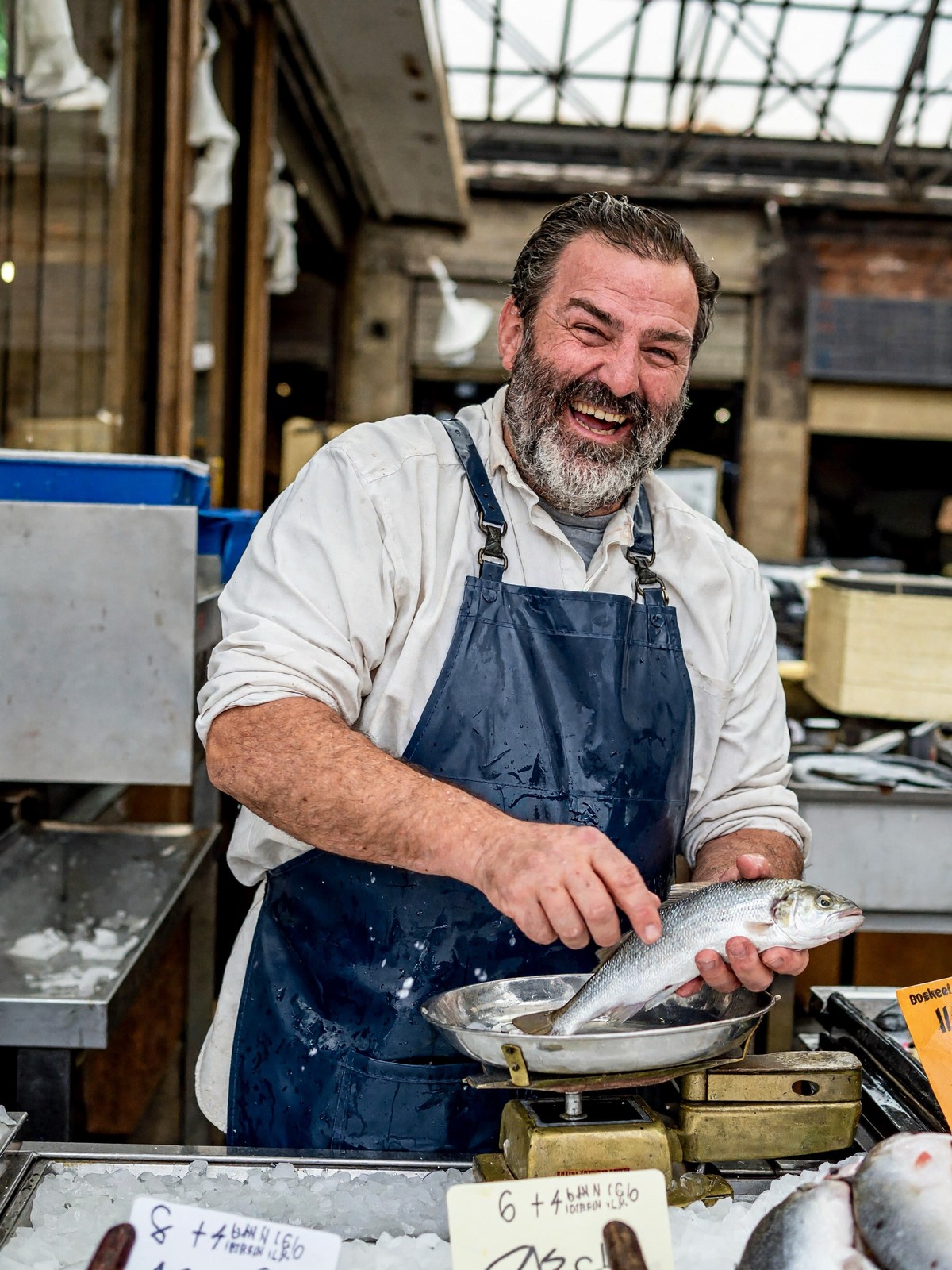
A candid photograph of a fishmonger in his fifties with a salt-and-pepper beard and a navy rubber apron, laughing as he weighs a silver sea bass on a brass scale. Crushed ice and small handwritten price tags fill the counter in front of him. Cold morning light falls from a market skylight above. Shot on a 50mm lens, natural skin texture, slight motion in his hands.
18. Architect’s Desk from Above
Give each object its own position around the blueprint. Naming the order of the colored pencils makes even the smallest part of the layout easy to check.
Parameters · Published settings · 16:9 · 4K
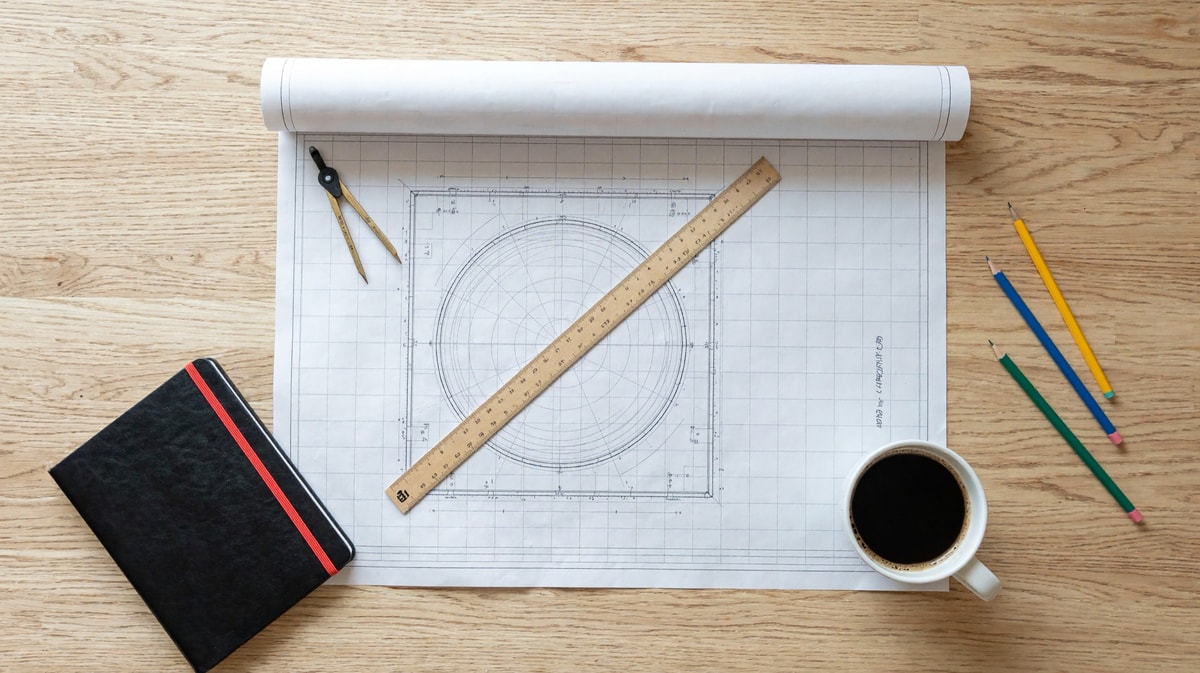
A photograph of an architect's desk seen from directly above. A large blueprint is unrolled across the center, held flat by a brass compass on its top left corner and a white coffee cup on its bottom right corner. A wooden scale ruler lies diagonally across the middle. To the left of the blueprint sits a closed black notebook with a red elastic band. To the right, three sharpened pencils lie side by side: one yellow, one blue, one green, in that order from top to bottom. Soft daylight from the left, pale oak desk surface.
19. Two-Color Bookshop Poster
Write the exact title, subtitle, and footer as separate lines. The print method and two ink colors give the typography and illustration a consistent texture.
Parameters · Published settings · 2:3 · 4K · Studio starting point 3:4 at 4K
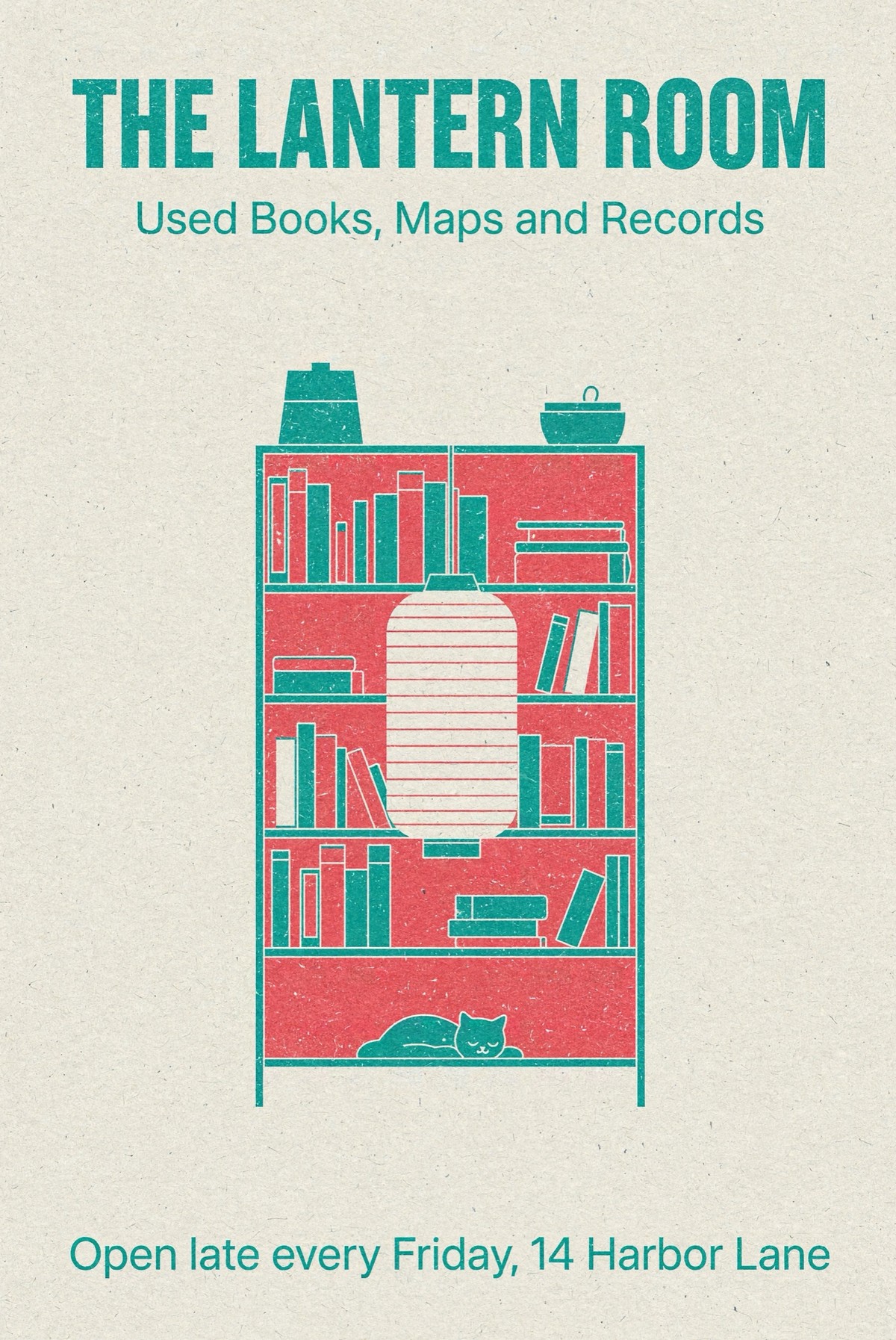
A risograph-printed poster for an independent bookshop in teal and coral ink on off-white paper. At the top, large bold sans-serif letters read "THE LANTERN ROOM". Under it, smaller text reads "Used Books, Maps and Records". In the center, a flat illustration of a tall bookshelf with a glowing paper lantern hanging in front of it and a sleeping cat on the lowest shelf. At the bottom, one line reads "Open late every Friday, 14 Harbor Lane". Visible grain and slight misregistration between the two inks. No other text.
20. Two-Page Café Menu
Set the heading for each page and keep every item next to its price. Zoom in after generation to proofread the printed words, accents, and decimals.
Parameters · Published settings · exact size 2304 × 1536 · 3:2 · Studio starting point 4:3 at 2K
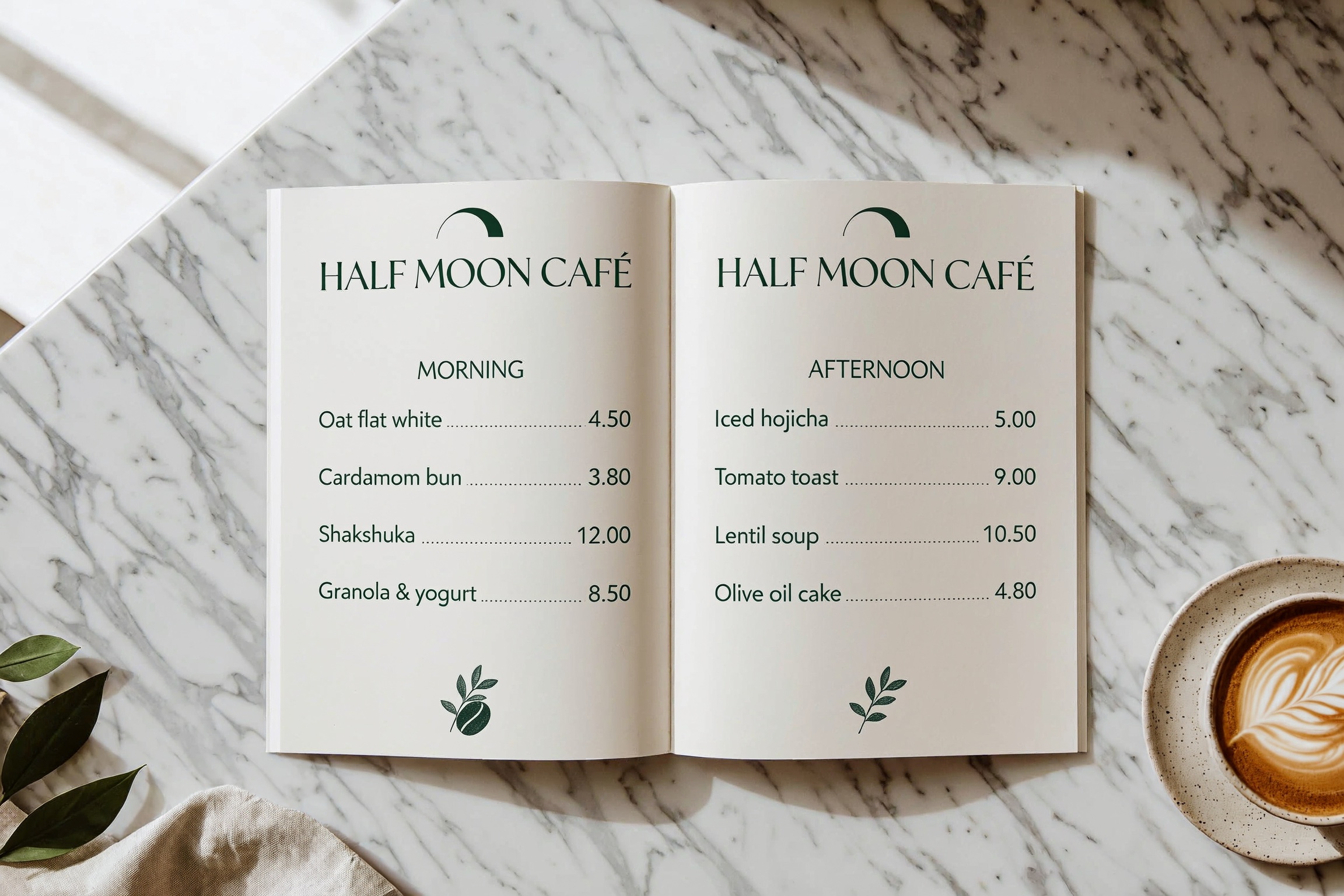
Overhead flat-lay photograph of an open printed two-page café menu on a white marble counter. Header across the top of both pages: "HALF MOON CAFÉ". Left page heading "MORNING", then one item per line with prices: "Oat flat white 4.50", "Cardamom bun 3.80", "Shakshuka 12.00", "Granola & yogurt 8.50". Right page heading "AFTERNOON": "Iced hojicha 5.00", "Tomato toast 9.00", "Lentil soup 10.50", "Olive oil cake 4.80". Cream paper, dark green serif headings, clean sans-serif items, a ceramic cup of coffee in the lower right corner, soft daylight.
How to adapt these prompts
- Start with the deliverable. Name the kind of image, its aspect ratio, and where it will be used. Keep an exact pixel size in the request when an API needs to fill a fixed slot.
- Give things a place. Use the edges, center, or thirds of the frame to anchor objects. State the count and reading order when subjects look alike.
- Quote words and numbers. Set the text in quotation marks and describe its position and line breaks. Proofread small text and verify numbers in the finished image.
- For edits, describe what stays. Upload references in the order you mention them, then name the specific change and the parts you want to preserve.
Open MiniMax H3 Image Studio · Open the MiniMax H3 Image editor